
When running the Navigator Duralink HHR and Memjet DuraLink PCS on the same PC, a port conflict may prevent XiService from starting correctly. This results in Navigator Server errors, failed head assignment, and inability to enable device threads. The issue is caused by both applications attempting to use the same TCP port (11000/11001 range).
Symptoms
Customers may report:
Navigator Server launches, but:
“One or more XiServices failed to start/connect”
Cannot enable Start Thread in Manage Devices
Head assignment fails
XiService startup errors in logs:
DuraLink PCS crashes if launched after Navigator Server
Navigator works only when DuraLink PCS is shut down
Port 11001 appears in use by another process (confirmed using tools such as CurrPorts)
Root Cause
Beginning with Navigator Duralink HHR R3, XiService was introduced and uses a default base port (11000 range).
Memjet DuraLink PCS also uses port 11001.
When both applications are installed on the same PC:
Both attempt to bind to the same port
XiService cannot start properly
PCS may crash if started second
Communication between Navigator and the device fails
Previous versions Navigator Duralink HMR R2.6 and older did not exhibit this issue because XiService was not used.
Resolution
File location: C:\ProgramData\Xitron\XiShare\Thriftport.json
- Open Thriftport.json in Notepad++
- Find the line "service:xiservice.xitron": 11000
- Change 11000 to 12000
- Then save and close the file.
See image below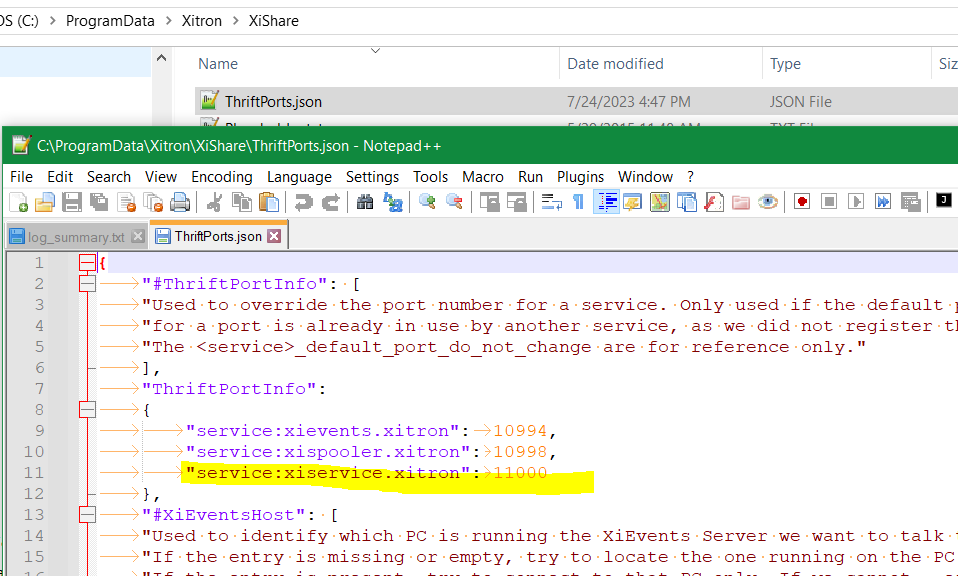
Additional Notes
Use a port monitoring tool (e.g., CurrPorts) to identify which process owns a port.
If the System process owns the port, a PC restart may be required.
Testing is recommended in a lab environment (e.g., Europa) before deploying